

Online learning has become more interactive as teachers and students look for ways to make lessons enjoyable, competitive, and easier to understand. Educational quiz platforms help achieve this by combining questions, game mechanics, and friendly competition. Blooket is one such platform that allows teachers to turn ordinary classroom questions into engaging activities. Students can participate using a game session code, answer questions, earn rewards, and compete with classmates in different game modes. This approach can make learning feel less like a traditional test and more like an entertaining challenge.
The growing interest in blooket codes comes from their role in connecting players to live game sessions. A code helps students enter a particular game without needing to search through a list of activities. However, these codes are generally associated with specific sessions, meaning they may stop working when a game ends or its host closes the session. Understanding how these codes function can save time and prevent confusion when joining a classroom activity. Whether you are a student preparing to enter a quiz or a teacher organizing an interactive lesson, knowing the correct joining process makes the experience smoother.
What Are Blooket Codes?
Blooket codes are session identifiers that allow players to join a particular live game hosted on the platform. When a teacher or another host starts a compatible game session, a unique code may be provided for participants to enter. Students can use that code on the appropriate joining screen to access the game. Depending on the session settings, they may also need to choose a nickname or complete other entry steps before the activity begins.
These codes are different from passwords, promotional codes, or permanent account credentials. They are primarily intended to connect players with an active game rather than unlock every feature of the platform. A code shared by a teacher during a lesson may work only for that particular session. If another teacher starts a separate game, participants will generally need the new session’s information. This temporary nature helps hosts manage classroom activities and control who joins their games.
How Blooket Codes Work
The process starts when a host selects a question set and launches a game using an available game mode. The platform creates a session that players can enter according to the host’s settings. The host then shares the joining information with participants, often through a classroom display, a message, or verbal instructions. Students enter the supplied code on the joining page and follow the prompts to participate.
Once players have joined, the host can begin the activity when the session is ready. Depending on the chosen mode, participants may answer questions individually, compete for points, or interact with game mechanics that reward correct answers. Some modes emphasize speed, while others focus on strategy or collecting in-game rewards. The code itself does not determine the questions or guarantee a particular result; it simply helps connect participants to the correct session. This distinction is important because a valid code cannot replace the host’s need to start and manage the game.
How to Join a Game Using Blooket Codes
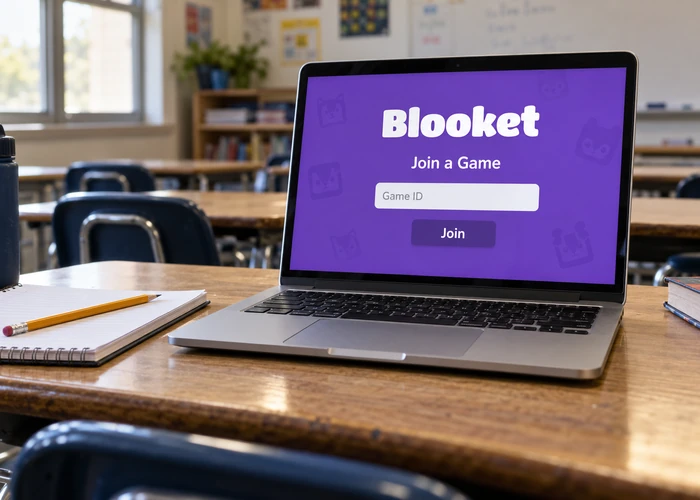
Joining a game is usually straightforward when the host has started an active session and provided the correct information. Students should first confirm that they have the current code rather than one copied from an older activity. They can then open the official Blooket platform, locate the game-joining option, and enter the code in the designated field. After submitting it, they should follow the instructions displayed on the screen.
The next step may involve selecting a nickname or confirming other details required by the host. Participants should choose an appropriate display name, particularly when playing in a school environment. Once connected, they may need to wait in the lobby until the host starts the game. If the code is rejected, checking for typing mistakes and asking the host to confirm the active session are sensible first steps. Repeatedly trying unrelated codes is unlikely to help if the original session has already ended.
Common Steps for Joining a Session
Although the exact screen layout can change, the general process follows a few simple steps:
- Obtain the current game code directly from the host.
- Open Blooket and navigate to the game-joining screen.
- Enter the code and complete any required prompts.
- Wait for the host to begin the activity.
Following these steps helps students avoid confusion and makes it easier for teachers to get an entire class ready before the lesson begins.
Why Some Blooket Codes Stop Working
One of the most common problems players experience is discovering that a code no longer works. In many cases, the reason is that the associated game session has ended. Since session codes are intended to connect players to specific games, they should not be treated as permanent access keys. A code that worked during yesterday’s classroom activity may not connect to a new session today.
Other problems can arise from simple typing errors, an incomplete joining process, browser issues, or a temporary connection problem. Occasionally, the host may have changed the session or started a new game before everyone joined. In these situations, requesting the latest code is usually more effective than repeatedly entering the old one. Players should also make sure they are using the correct joining page and that their internet connection is stable. If the issue continues, refreshing the page or trying another supported browser may help.
Types of Blooket Game Sessions
Blooket offers different game experiences that can support classroom learning in several ways. The available modes may vary over time, but the general idea is to combine educational questions with game mechanics that keep participants engaged. A teacher might choose a mode that encourages quick responses for a short review session or select a more strategic activity when students need additional motivation to practise a subject.
The joining code does not normally indicate which game mode will be used. Players discover the format after entering the session or receiving instructions from the host. Understanding the purpose of the activity can help participants adjust their approach. In a speed-focused game, accuracy and quick thinking may be important, while a strategy-based mode might reward careful decisions in addition to correct answers. Teachers can use these differences to match activities with learning objectives rather than relying on competition alone.
| Game session element | Purpose | What players should know |
|---|---|---|
| Session code | Connects players to a live game | Use the code provided for the current session |
| Question set | Supplies the educational content | Topics and difficulty depend on the selected set |
| Game mode | Determines the gameplay experience | Rules and mechanics can vary |
| Nickname | Identifies a participant in the session | Follow classroom naming guidelines |
| Host controls | Manage the session and its start | Players may need to wait before gameplay begins |
This structure makes it easier to understand why joining a session is only the first step. The question set, game mode, and host settings determine what happens after participants enter.
Are Blooket Codes Available for Free?
Students can often join classroom games without needing to purchase a separate paid subscription simply to participate in a session. However, access to particular features may depend on the platform’s current account rules, the host’s setup, and any subscription-related restrictions. Players should distinguish between entering a game and accessing advanced features that may be available only under specific conditions.
It is also important to understand that ordinary game session codes are not the same as codes that provide paid benefits or unlock premium features. Websites or posts claiming that a random session code can grant unlimited rewards, special account privileges, or guaranteed access to restricted features should be approached carefully. A session code is designed for joining a game, not for bypassing account requirements. Students should use the platform as intended and follow their teacher’s instructions when participating in school activities.
How Teachers Can Use Game Codes Effectively
For teachers, the value of a game code extends beyond making a lesson entertaining. It offers a simple way to bring an entire class into the same interactive activity. Educators can use quiz games to review a recent chapter, check students’ understanding before an assessment, introduce a new topic, or revisit questions that caused confusion during a previous lesson. Because participants can join the same session, the teacher can organize a shared activity without asking every student to locate the question set independently.
Preparation is still essential. Teachers should select questions that match the lesson’s objectives, test the session before class, and display the joining instructions clearly. It can also be helpful to establish expectations about appropriate nicknames, respectful competition, and responsible device use. After the game, educators can discuss difficult questions and explain why particular answers are correct. This follow-up turns the activity into a learning opportunity rather than a competition focused only on scores.
Safety Tips When Searching for Blooket Codes
Searching online for a game code may lead to old posts, unofficial code lists, or claims that particular codes remain active indefinitely. Because session codes can become invalid, a list published earlier may no longer provide useful access. Students should prioritize codes shared by their teacher, classmates participating in the same activity, or another authorized host. This approach is more reliable than relying on unverified information from unrelated sources.
Privacy also matters when joining educational games. Players should avoid using full names, personal phone numbers, home addresses, or other sensitive information as nicknames. They should never share account passwords or personal details with someone claiming that such information is required to activate a session. If a page asks for unusual personal information before allowing a player to enter an ordinary classroom game, it is worth stopping and checking whether the page is legitimate. Teachers and parents can help younger students recognize these warning signs.
Common Mistakes to Avoid
Even though joining a game is relatively simple, small mistakes can delay the start of a classroom activity. One frequent problem is using an outdated code from a previous session. Another is entering the code incorrectly because of a missing character or an accidental space. Students sometimes assume that a game has started as soon as they enter the code, even though the host may still be waiting for other participants.
Players can avoid many of these problems by following the instructions carefully and confirming that they are joining the intended session. They should also avoid repeatedly refreshing the page while a game is loading, particularly when their connection is slow. If the joining screen does not respond, checking the connection and asking the host whether the session remains active are reasonable next steps. A calm, systematic approach is more effective than trying random codes or changing several settings at once.
Can You Reuse an Old Blooket Code?
Whether an old code works depends on the status of the session it identifies. If the original game has ended or the host has closed it, the code may no longer provide access. A code should therefore be understood as session-specific information rather than a permanent invitation to play whenever someone chooses. Even when a code appears in an old message or screenshot, that does not guarantee that its associated game is still available.
For students who regularly participate in classroom activities, the simplest solution is to request the current code whenever a new session begins. Teachers can reduce confusion by sharing the code shortly before the activity and explaining when students should join. This also helps ensure that participants enter the correct game instead of accidentally joining an unrelated session. Keeping joining instructions current is particularly useful when a class uses the platform for multiple subjects or different activities throughout the week.
Conclusion
Blooket makes educational activities more engaging by combining quizzes with interactive gameplay. Session codes provide a straightforward way for students to enter live games, while teachers can use the platform to review lessons, encourage participation, and identify areas where additional explanation may be needed. Understanding how these codes work makes it easier to join activities, troubleshoot common errors, and avoid confusion caused by expired sessions.


