

Finding a working game code can be the first step toward joining an exciting classroom quiz or multiplayer learning session. Unlike permanent passwords, these codes are connected to individual live games created by a host. That means a code that works at one moment may stop working after the session ends. Understanding this temporary system makes it much easier to join games without wasting time searching for codes that are no longer active.
The popularity of Blooket comes from its combination of educational questions and game-style competition. Teachers can choose a question set, select an available game mode, and invite students to participate. Students can then enter the provided Game ID, choose a nickname, select a Blook, and wait for the host to begin. Official guidance confirms that students can join a live game without creating an account, while an account provides additional features such as saved progress and access to personal Blooks.
What Are Blooket Codes?
A game code is a temporary identification number generated when a host creates a live game. It allows players to connect to that specific session rather than searching through the entire platform for a particular classroom activity. The host normally shares the code with participants on a classroom screen, through a message, or using another communication method.
The important point is that codes are not designed to function as permanent access keys. A player may find a code posted somewhere online, but that does not mean it will still work. The associated game could already have ended, the host may have closed the session, or the code may have been replaced by a new game. For this reason, the most dependable source of a current code is the person hosting the game.
How Do Blooket Codes Work?
When a teacher or another authorized host prepares a live session, they select a question set and a game mode before starting the activity. After the game is created, the platform provides information that participants can use to join. This can include a Game ID, QR code, or join link. The host then shares one of these options with the players.
Players use the provided information to connect to the correct session. According to the official student instructions, participants can enter the Game ID, scan a QR code, or use a shared join link. After entering the session, players provide a nickname and may choose a Blook while waiting for the game to begin.
Why Codes Change
Every live game has its own session information. Therefore, codes should be treated as temporary rather than reusable. A code from yesterday’s classroom activity is unlikely to help someone join today’s game because the host generally creates a new session.
This is also why websites or social posts claiming to provide an unlimited collection of working codes can be misleading. Even if a number was genuine when published, it may have expired by the time another person tries it. Looking for the newest code is less useful than getting the code directly from the host.
How to Join a Live Game
Joining a live session is straightforward when you already have the correct code. First, open the official game-joining page and enter the Game ID supplied by the host. The platform currently describes the Game ID as a seven-digit code in its student joining instructions.
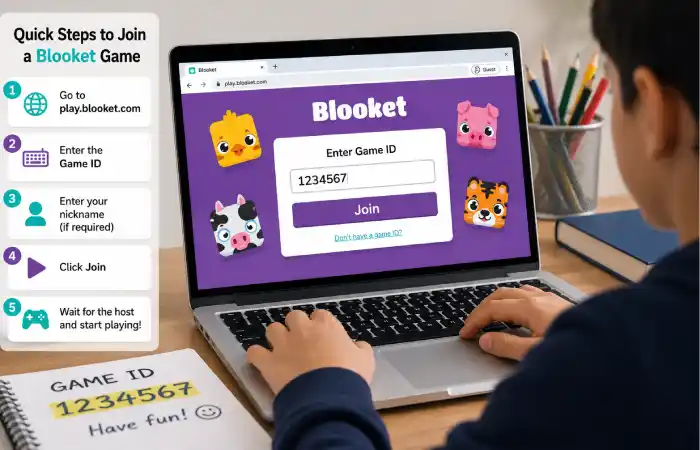
After entering the code, you will normally be asked to provide a nickname. If the host has enabled random names, the system can generate a name instead. Once inside the waiting area, you can select a Blook if the game provides that option. The host controls when the session begins, so reaching the waiting screen does not necessarily mean the quiz has started.
The process can be summarized as follows:
- Get the current Game ID from the teacher or host.
- Enter it on the game-joining screen.
- Choose an appropriate nickname.
- Select a Blook and wait for the host to begin.
A student account is not required simply to participate in a live game. However, logging into an account can provide additional benefits, including the ability to use personal Blooks and maintain certain account-related progress.
Where Can You Get Active Game Codes?
The best place to get an active code is directly from the person hosting the game. In a classroom, the teacher may display it on a projector or classroom screen. During a virtual lesson, the teacher might send a join link or display a QR code instead. These methods are more reliable than searching for random numbers online because they are connected to the current session.
Some players search social media pages, forums, or websites for publicly posted game IDs. Although this may occasionally lead to an active session, there is no guarantee that the code is still available or that the game is intended for public participation. A code can become useless once the host ends the session.
| Joining Method | What You Need | Best Use |
|---|---|---|
| Game ID | Current game code | Classroom or direct joining |
| QR Code | Phone or tablet camera | Fast classroom access |
| Join Link | Shared session link | Online classes |
| Homework Link | Assignment link | Teacher-assigned work |
The platform officially supports these different joining methods, giving hosts flexibility depending on whether students are physically together or participating remotely.
What If Your Blooket Code Does Not Work?
A non-working code does not necessarily mean there is a problem with your device. The most common explanation is simply that the game associated with the code is no longer available. Because live sessions are temporary, an old code can become invalid after the host finishes the activity.
If you believe the session should still be active, ask the host to confirm the number. Enter each digit carefully because even one incorrect character will prevent you from entering the intended game. You should also make sure you are using the correct joining page rather than attempting to enter the code somewhere else.
Connection or browser problems can also interfere with joining. Official troubleshooting information notes that browser extensions such as ad blockers can sometimes interfere with platform functionality. Network restrictions may also cause problems in some environments.
Quick Troubleshooting Steps
If a code appears to be invalid, try these steps:
- Ask the host for a newly confirmed Game ID.
- Refresh the joining page and enter the number again.
- Check your internet connection.
- Temporarily check whether a browser extension is interfering.
If other students can enter the same session while your device cannot, the issue may be related to your browser, network, or device rather than the game itself.
Can You Join Without an Account?
One useful feature for students is that an account is not required simply to participate in a live classroom game. The official help center states that students can use a Game ID, QR code, or join link without logging in. This makes it possible for a teacher to begin an activity without requiring every participant to create an account first.
Creating an account can still be useful for students who want additional features. Logged-in players can unlock Blooks, track statistics, and access solo gameplay. However, whether an account is appropriate depends on the student’s age, school rules, and the platform’s current account requirements.
Blooket Codes and Classroom Learning
The value of a live game code goes beyond simply getting students into a multiplayer activity. It creates a direct connection between a teacher’s selected question set and the students participating in that lesson. Instead of handing every learner a separate worksheet, the teacher can bring the class into one interactive environment.
The platform is designed around question sets and different game modes. Teachers can select an existing set or create their own and then choose a suitable live mode. The official platform currently describes multiple live modes, giving educators different ways to structure classroom activities.
This flexibility can make review sessions more engaging. For example, a teacher reviewing vocabulary could use a competitive mode before an assessment, while a mathematics class could turn practice questions into a timed activity. The game itself adds motivation, but the quality of the underlying questions remains important.
Why Searching for Random Codes Can Be Unreliable
Many people searching for game IDs expect to find a permanent collection of codes that they can use whenever they want. That expectation does not match how live sessions operate. A code identifies a particular game session, so its usefulness depends on whether that session is currently open.
This means that a list published several days or weeks ago can contain numbers that no longer lead anywhere. Players may repeatedly enter different codes and assume the platform is malfunctioning when the real problem is simply that the sessions have ended.
There is also a difference between finding a code and being invited to participate. A publicly visible code may belong to a classroom activity that was intended only for a particular group. Students should follow their teacher’s instructions rather than attempting to enter private classroom sessions without permission.
Tips for a Better Joining Experience
The easiest way to avoid problems is to treat the game code as information supplied for a specific session, not as a permanent resource. If your teacher displays the code, enter it carefully and join promptly. If a QR code or join link is available, using those options can reduce typing mistakes.
It is also helpful to keep the joining page ready before the teacher starts the activity. This is particularly useful in classrooms where many students are attempting to connect at the same time. If the game is hosted remotely, following the teacher’s shared instructions can help you choose between a Game ID, QR code, or direct join link.
Conclusion
Blooket codes are temporary game identifiers that connect players to specific live sessions. They are useful because they allow teachers to bring students into an interactive quiz quickly, but they are not permanent passwords that can be reused indefinitely. A code can stop working when the associated game ends, which is why obtaining the current Game ID directly from the host is the most dependable approach. Students can generally join a live game without an account by using the provided Game ID, QR code, or join link. Once inside, they can enter a nickname, choose a Blook when available, and wait for the host to start. If a code fails, checking with the host, confirming the digits, refreshing the page, and troubleshooting browser or network issues are sensible first steps.


.jpg&description=Learn how Blooket codes work, where to get active game IDs, how to join live matches, and what to do when a code expires or does not work.)